
AQ99 Game APK Latest Earning App in Pakistan Download Free
AQ99 game is a mobile gaming platform designed for users who want to explore different such type of games and features in one place. It offers a simple interface, easy navigation, regular updates, and quick access to its main sections for a smoother gaming experience.

AQ99 Game is a gaming platform that can be accessed through a mobile-oriented interface, with different sections for games, account management, settings, updates, and user support. The exact layout and available options can change between versions or devices, so users should always check the information displayed in the version they are using.
For Pakistani readers, the most useful way to understand AQ99 is to look at the platform section by section rather than focusing only on the download page. The home area, game library, dashboard, account settings, notifications, security controls, and help options all have different purposes.
This guide explains those areas in simple English. It focuses on how the interface is organized, what users may find inside each section, and what to check when using or updating the application.
Table of Content
Table of Contents
Understanding the AQ99 Game Platform Before Using It
AQ99 game can be understood through several main areas. These areas are designed to separate game discovery from account management and general settings.
The home screen is normally the starting point. From there, users can look for featured content, recently added titles, popular sections, or shortcuts to other parts of the platform.
The exact names and arrangement of buttons can vary according to the version being used. A newer version may place some options in a bottom navigation bar, while another version may put them inside a side menu or dashboard.
What the Main Interface Is Designed For AQ99 Game?
A well-organized game interface usually allows users to reach important sections without repeatedly returning to the main page.
Common areas associated with the AQ99 interface include:
- Home and game discovery
- Game categories
- User profile
- Account information
- Activity and game history
- Notifications
- Settings
- Security options
- Help and support
- Version and update information
The important point is that these sections have different purposes. Game categories help with discovery, while account and security pages are intended for personal account management.
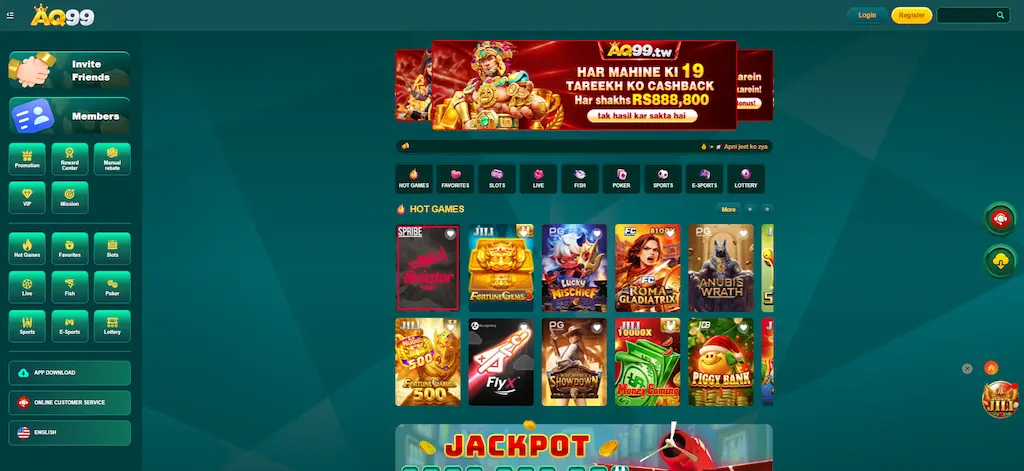
Home Screen and Quick Navigation
The home area provides an overview of the platform. Depending on the version, users may see featured games, newly listed titles, popular categories, or shortcuts.
A quick-access area can be useful when several sections are available. Instead of searching through every menu, users can move directly to commonly used parts of the application.
Users should also pay attention to the spelling of the application name, website address, and application publisher when accessing a download page. This helps reduce confusion between similarly named applications.
AQ99 Game Download and App Information
One of the most searched topics around AQ99 is app access. Android users may encounter references to an APK or an application package. An APK is the installation package format used by Android.
The presence of an APK does not by itself establish that an application is affiliated with Google Play or Android. Users should verify the source and application information before installing anything.
Android Compatibility
AQ99 may be designed primarily around mobile use, but exact compatibility can depend on the application version and Android device.
Before installing an application, check:
- Android version requirements
- Available device storage
- Application size
- Required permissions
- Publisher or developer information
- Version number
- Date of the latest release
- Whether the source is trustworthy
A phone that can run one version may not necessarily provide the same experience with another version.
APK Version and Updates
The version number is useful when checking whether an application is up to date. A version number normally appears on the download or application information page.
Users should avoid assuming that the highest-looking version number is automatically the correct one. The version should be checked against a reliable source associated with the application.
When an update is available, read the update information if provided. Updates can contain interface changes, compatibility improvements, bug fixes, or changes to individual sections.
AQ99 Game General Installation Considerations
If an Android application is being installed outside an official app marketplace, Android may display a security warning. Do not disable security protections simply to force an installation.
Before continuing, check the source, application name, permissions, and file information. If the source cannot be verified, it is safer not to proceed.
Creating and Managing an AQ99 Game Account
An account area allows users to manage personal profile information and access the application’s available features.
The exact registration process can differ between versions. A registration screen may request basic information, while another version may use a different verification method.
Creating an Account
If registration is available, users should enter their information carefully and review the details before submitting the form.
Important points include:
- Use information that belongs to the account holder.
- Check spelling before submitting.
- Use a strong and unique password when a password is required.
- Keep verification information private.
- Never share one-time verification codes with another person.
- Read the account terms before completing registration.
Users should also avoid creating unnecessary duplicate accounts if the platform’s rules do not permit them.
Account Verification of AQ99
AQ99 verification can be used to confirm account ownership. The exact process depends on the current version and the information requested by the service.
If a verification code is sent to a phone or email address, it should only be entered into the intended account screen.
A legitimate support representative should not need a user’s private password or one-time security code.
Login and Password Recovery
The login page normally provides access to an existing account.
If a password is forgotten, use the recovery option provided on the login screen rather than relying on unofficial instructions.
A password reset process may require account information or a verification step. Follow only the information displayed by the service.
If recovery does not work, the safest option is to contact the platform’s available support channel.
Exploring the AQ99 Game Dashboard
The dashboard acts as a central area for account-related information. Instead of searching through individual game pages, users can normally manage personal account options from here.
Profile and Account Information
The profile area may contain basic account details. Depending on the version, it can also provide access to settings connected with the user’s account.
When reviewing profile information, check that important details are correct.
If the application provides an option to edit information, review the changes before saving them.
Game History and Activity Records of Game AQ99
History sections can help users review previous activity associated with the account.
A game history may show previously opened or played titles, while an activity history can contain broader account actions.
These records are useful when investigating an unexpected account event or checking when a particular action occurred.
The information displayed can vary by version, so users should treat the labels shown inside their own dashboard as the most relevant reference.
Notifications
Notifications can contain account messages, application updates, system alerts, or other information.
Users should read unexpected security notifications carefully. If an alert reports a login or account action that the user does not recognize, account security should be reviewed immediately.
Finding Games Inside AQ 99 Game
A game library is easier to use when titles are divided into understandable categories.
AQ99 may organize games through several sections, although the exact selection can change according to the current version.
Popular and New Game Sections of AQ99
A popular section of AQ 99 is generally intended to make frequently viewed titles easier to discover.
A new-games section can help users find recently added titles.
Neither category should automatically be treated as an indication of quality or suitability. A title being displayed prominently does not explain its rules or technical requirements.
Arcade and Casual Games of A Q99
Arcade-style games often focus on quick interaction and straightforward controls.
Casual games generally use simple interfaces that can be easier for new users to understand.
The actual titles included in these categories can change, so users should check the current game list rather than relying on an old catalogue.
Card and Sports Sections of AQ99 APK
Card-style games may use familiar card-based interfaces, while sports-related sections can organize games around sporting themes.
The rules and controls of each individual title should be checked inside that game. Similar-looking games can still have different controls, menus, and operating systems.
Other Available Categories
A platform may also provide additional categories that do not fit neatly into the main groups.
When exploring an unfamiliar title, check its information or help area first. This is often the easiest way to understand the objective, controls, settings, and available game modes.
AQ99 Game Interface and Gameplay Controls
The visual interface is an important part of the user experience. A simple layout can make it easier to locate controls, settings, and information.
Game Screen Layout
A typical game screen may contain several areas, such as:
- Main gameplay area
- Menu or information button
- Sound controls
- Settings
- Game controls
- Navigation buttons
- Exit or return option
The position of these controls can change between games.
Game Modes and Controls of AQ99
Not every title uses the same control system. Some games may require taps, while others may use buttons, selections, or other touch controls.
Before starting an unfamiliar title, look for an information or help button. Reading the basic instructions can prevent accidental selections and make the interface easier to understand.
Sound and Language Settings
Sound settings may allow users to control music, effects, or other audio elements.
If multiple languages are supported, a language option may appear inside the settings menu. Availability depends on the application and individual game.
Users should remember that changing the main application language does not necessarily mean every individual game supports the same languages.
AQ99 Game Account Security and Privacy Controls
Account security deserves attention regardless of which game or application is being used.
Changing a Password
If the application provides a password-change option, choose a password that is difficult to guess and not reused on other important accounts.
A good password should not contain obvious personal information.
After changing a password, avoid saving it in public places or sharing it through messages.
Login History and Security Settings
A login-history section can be useful for identifying unfamiliar access.
If the application provides security settings, review them periodically. Look for options related to:
- Password protection
- Verification
- Login sessions
- Account privacy
- Device access
- Notifications
If an unfamiliar login appears, change the password and follow the account recovery or security process provided by the service.
Privacy Settings
Privacy settings determine what account information is visible or how certain application features handle user information.
Before accepting a permission request, consider whether that permission is relevant to the application’s purpose.
Users should be especially careful with requests for unnecessary access to contacts, messages, files, microphone, camera, or location.
Safe Logout Practices
Use the application’s logout option when finishing on a shared device.
Avoid leaving an account open on a computer or phone that other people can access.
For personal devices, additional screen-lock protection can provide another layer of account security.
Understanding Transaction and Account Record Sections of AQ99 Game
Some versions or platform areas may contain transaction-related menus. These sections should be understood as account records rather than instructions for financial activity.
Transaction History
A history page can help users identify previous account records associated with the platform.
Information shown may include dates, reference numbers, status labels, or other account-related details.
If a record appears unfamiliar, take a screenshot for your own reference and contact the relevant support channel.
Transaction Status
A status label may indicate whether an account action is pending, completed, rejected, or otherwise being processed.
The exact wording can differ between versions.
Users should not rely on screenshots or instructions from unrelated sources because interface labels can change.
Why Account Records Matter in AQ99?
Keeping track of account activity can help users identify mistakes or unexpected actions.
If an account record does not match the user’s own activity, contact support through the platform’s available channels rather than sharing account credentials with another person.
Promotions, Offers, and In-App Notices of AQ99 Game
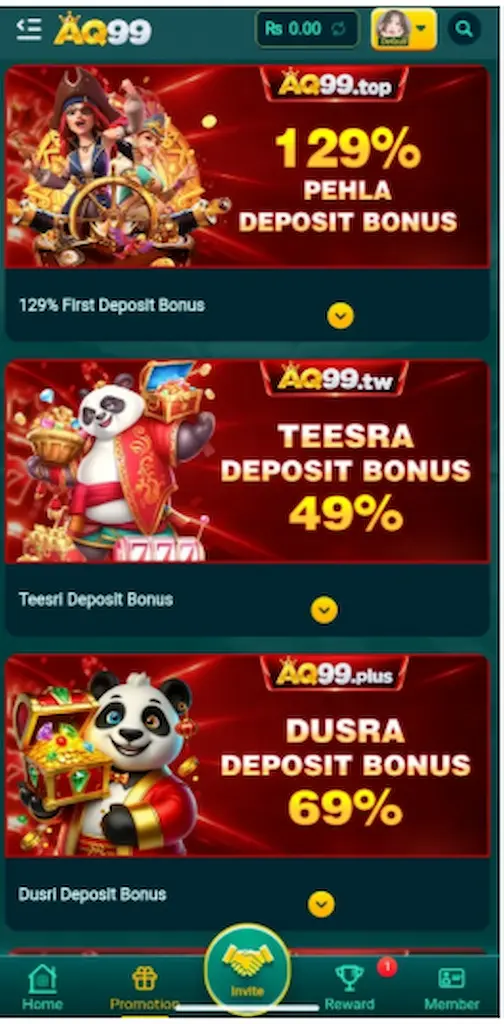
AQ99 may display promotional or informational notices depending on the version and region.
Such notices should be read carefully before taking any action.
Understanding Offer Information
When an offer is displayed, check:
- Eligibility requirements
- Expiry date
- Applicable game or section
- Conditions
- Any restrictions
- Whether the offer is currently active
Do not assume that an offer shown in an old screenshot is still available.
Why Terms Matter
Short promotional messages may not contain every condition. If additional terms are available, read them before accepting an offer.
The most important information is the current set of conditions shown by the service at the time the offer is presented.
Using the AQ99 Game Guide and Help Areas
A built-in help area can make the application easier to understand, particularly for new users.
Instead of trying random settings, users can check the relevant help topic first.
Useful Guide Topics
A practical guide section may cover:
- Getting started
- Account creation
- Login
- Application installation
- Dashboard navigation
- Finding games
- Updating the application
- Common technical problems
These topics are more useful when they match the current application version.
Troubleshooting Common Problems of AQ99 Game
If AQ99 does not open correctly, start with basic checks.
Application does not start:
- Restart the device.
- Check available storage.
- Confirm that the application is compatible with the Android version.
- Check whether an update is available.
- Reinstall only when the application source can be verified.
Login does not work:
- Check the entered information.
- Confirm that the internet connection is stable.
- Use the account recovery option if necessary.
- Check whether the service is reporting maintenance.
Pages load slowly:
- Test the internet connection.
- Close unnecessary background applications.
- Restart the application.
- Check whether the problem affects other websites or apps.
Notifications are missing:
- Check notification permissions.
- Review the application’s notification settings.
- Check the device’s battery-saving restrictions.
AQ99 Game Customer Support and Getting Help
A support section is useful when normal troubleshooting does not solve an account or technical issue.
Help Center
The help center may contain answers to common questions about account access, application use, and technical problems.
Before contacting support, note the exact issue and any error message shown on screen.
Contact Support
When contacting support, provide only information that is necessary to explain the problem.
A useful support message normally includes:
- Device type
- Application version
- General description of the problem
- Error message
- Approximate time when the problem occurred
- Screenshot of the error, when appropriate
Never send your password or private verification code as part of a support request.
Account, Login, and Installation Problems
Different problems should be reported clearly.
For example, “AQ99 is not working” is less useful than “The application opens but closes after the loading screen.”
A precise description helps support understand what is happening.
AQ99 Game on Different Devices
The user experience can differ between smartphones, tablets, and desktop environments.
Android Phones
A modern Android phone can provide a convenient touch-based interface, but compatibility still depends on the application version.
Screen size, Android version, storage, processor performance, and network quality can all affect the experience.
Tablets
A larger display may make menus easier to read, but an application designed primarily for phones may not use the additional screen space efficiently.
Check how the interface responds to landscape and portrait orientation if both are available.
Desktop Browsing
If a browser version is available, the desktop interface may look different from the mobile application.
Do not assume that every feature visible on a phone will appear in exactly the same place on a desktop screen.
Frequently Asked Questions About AQ99 Game
What is AQ99 Game?
AQ99 Game refers to a digital gaming platform/interface with sections for game discovery, account management, settings, notifications, and support. The exact games and functions can vary according to the current version and access method.
Is AQ99 available on Android?
AQ99 may be available through Android-compatible access, but users should check the current application requirements before installation. Compatibility can depend on the Android version and specific device.
What is an AQ99 APK?
An APK is an Android application package. If AQ99 is distributed as an APK, users should verify the source, application identity, version, and permissions before installing it.
How can I create an AQ99 account?
If registration is available in the current version, use the registration option shown by the application and enter the requested information carefully. Complete any verification step provided on the account screen.
How do I log in to AQ99?
Open the login page and enter the account information requested by the current version. If access fails, check the information entered and use the available recovery option when necessary.
What can I find in the AQ99 dashboard?
The dashboard may provide access to profile information, account details, history, notifications, and settings. The exact arrangement can differ between versions.
Can I change my AQ99 password?
If password management is available, users can normally find it under account or security settings. Use a unique password and do not share it with other people.
Conclusion
AQ99 Game brings several different functions into one interface, including game discovery, account management, settings, notifications, security controls, history, and help resources. Understanding the purpose of each section can make navigation easier, especially for users who are opening the platform for the first time.
The AQ99 game library and interface may change as new versions are released. For that reason, users should rely on the information displayed by their current version when checking compatibility, available games, account options, and application settings. Android users should also verify an APK’s source and permissions before installing it.
For Pakistani users, the most practical approach is to use AQ99 as an information-first experience: understand the interface, read individual game instructions, protect account credentials, review settings, and use the available support system when something is unclear. This provides a clearer understanding of the platform without relying on unsupported claims or assumptions about